You are reading this on a device powered by software. The browser displaying this page is software. The operating system running underneath — software. The server that delivered this content to you in milliseconds — software. And yet, despite being everywhere, most people have never stopped to ask: what is software, really?
In this in-depth guide, the ClickMasters team breaks down everything you need to know about software in 2026 — its definition, how it works, the different types of software, real-world examples, and why custom software development and professional software development solutions have become the competitive edge that separates thriving businesses from those struggling to keep up.
Whether you are a student looking to understand technology, a business owner exploring digital tools, or an entrepreneur evaluating software options — this guide is written for you.
At ClickMasters, we have built and deployed software for businesses across industries. That hands-on experience shapes everything in this guide — giving you not just textbook definitions, but real, actionable knowledge.
Table of Contents
What Is Software? — The Clear Definition

Software is a set of instructions, programs, and data that tells a computer or electronic device how to perform specific tasks. Unlike hardware — the physical components you can see and touch — software exists purely as code: logical instructions written by developers and executed by machines.
The formal software definition in computer science: a collection of programs, procedures, algorithms, and associated documentation that direct the operations of a computer system.
The word ‘software’ was first coined by statistician John Tukey in 1958, but it was the personal computer boom of the 1980s that turned software into the multi-trillion-dollar global industry it is today. By 2026, the global software market will surpass $1 trillion annually — larger than the GDP of most countries.
Simple analogy: Hardware is the human body — muscles, bones, organs. Software is the brain and nervous system — the intelligence that tells everything what to do, when, and how.
Every interaction you have with a digital device — unlocking your phone, opening an app, making a bank transfer, watching a video — involves software executing thousands of instructions in fractions of a second. Understanding what software is is the foundation for understanding how the modern world works.
How Is Software Different from Hardware?
A common point of confusion for beginners is the difference between software and hardware. They work together as a team — but they are fundamentally different in nature, role, and behavior.
| Feature | Software | Hardware |
| Nature | Intangible — exists as code | Tangible — physical components |
| Examples | Windows 11, Chrome, MS Word | CPU, RAM, SSD, Keyboard, Screen |
| Can be touched? | No | Yes |
| Physical damage? | No (only corrupted/buggy) | Yes (heat, water, impact) |
| How created? | Written by developers in code | Manufactured in factories |
| Updated how? | Downloads & patches (instant) | Physical replacement required |
| Lifespan | Can be used indefinitely if maintained | Degrades physically over time |
Think of it this way: a gaming console is hardware. The game you play on it — that is software. A hospital’s MRI machine is hardware. The software running the scan, interpreting the image, and storing patient data is what makes it intelligent.
What Are the Main Types of Software? (Full Breakdown)
Understanding the types of software is critical for anyone working in tech, managing a business, or simply wanting to be digitally literate. Software is divided into three primary categories, each serving a distinct role in the computing ecosystem.
System Software — The Foundation Layer
System software is the backbone that makes all other software possible. It manages and communicates directly with hardware, creating a stable environment where applications can run. Without system software, a device is just a collection of inert parts.
Key types of system software include:
• Operating Systems (OS): The most well-known type of system software. Examples include Windows 11, macOS Sequoia, Ubuntu Linux, Android 15, and iOS 18. The OS manages memory, processes, file systems, and user interfaces.
• Device Drivers: Small programs that allow the OS to communicate with hardware components — your graphics card driver, audio driver, printer driver, and USB controller all fall into this category.
• Firmware: Permanent software embedded into hardware chips — like BIOS/UEFI on a motherboard, the firmware in your router, or the embedded code in a smart thermostat.
• Utility Software: Background tools that maintain system health — antivirus programs, disk cleanup utilities, backup tools, file compression software like WinRAR, and system monitoring dashboards.
System software runs quietly in the background. You rarely see it, but every tap, click, and keystroke you make passes through it.
Application Software — What Users Actually See and Use
Application software — commonly called ‘apps’ — is what end users interact with directly. This is the most visible, most downloaded, and most purchased category of software. When most people say ‘software,’ they usually mean application software.
Major categories of application software:
• Productivity & Office Tools: Microsoft 365, Google Workspace, Notion, LibreOffice — used for document creation, spreadsheets, and presentations.
• Communication Platforms: WhatsApp, Slack, Zoom, Microsoft Teams, Telegram — enabling real-time messaging, video calls, and collaboration.
• Entertainment & Media: Netflix, Spotify, YouTube, Steam, Apple Music — streaming, gaming, and content consumption.
• E-Commerce & Retail: Shopify, WooCommerce, Magento, BigCommerce — powering online stores and digital transactions.
• Finance & Accounting: QuickBooks, Xero, Wave, FreshBooks — managing invoices, expenses, payroll, and financial reporting.
• Healthcare & Medical: Epic Systems, Zoho Health, Practo, hospital management systems — managing patient records, diagnoses, and appointments.
• CRM & Sales: Salesforce, HubSpot, Zoho CRM — tracking leads, customers, and sales pipelines.
At ClickMasters, we specialize in building custom application software tailored to your business. Whether you need a CRM, an inventory system, a customer portal, or an e-commerce platform — our team builds it from the ground up. Explore our Software Development Solutions to see how we turn business challenges into powerful digital tools.
Programming & Development Software — How Software Gets Built
This category includes all the tools that software developers use to create, test, and deploy other software. Without development software, the applications you use every day would not exist.
• Integrated Development Environments (IDEs): Visual Studio Code, JetBrains IntelliJ, Xcode, Eclipse, PyCharm — full coding workspaces with editors, debuggers, and build tools.
• Compilers & Interpreters: Tools that convert human-written code into machine-readable binary. GCC for C/C++, JDK for Java, Python interpreter, Node.js for JavaScript.
• Version Control Systems: Git, GitHub, GitLab, Bitbucket — tracking code changes, enabling team collaboration, and managing release histories.
• Database Management Tools: MySQL Workbench, pgAdmin, MongoDB Compass, DBeaver — designing and managing data structures.
• Testing & QA Tools: Selenium, Jest, Postman, JUnit — automated testing frameworks that catch bugs before software reaches users.
How Does Software Actually Work?
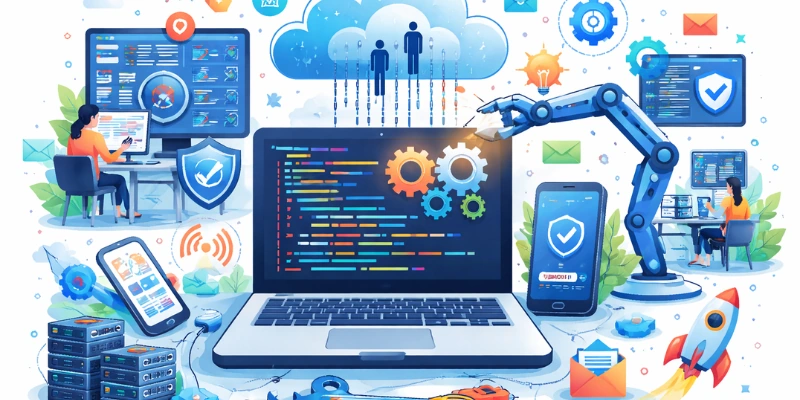
Most people use software every day without ever thinking about what happens under the hood. Understanding how software works gives you a new appreciation for the engineering behind even the simplest app.
The software execution process, step by step:
10. Writing the Code: A developer writes instructions in a programming language — Python, JavaScript, Java, C++, Swift, or others. This is human-readable logic: ‘if user clicks button, show menu.’
11. Compilation or Interpretation: The source code must be translated into machine language (binary: 0s and 1s) that the CPU understands. This is done by a compiler (translates all at once) or an interpreter (translates line by line).
12. Storage: The compiled program is stored on a hard drive or SSD. For web apps, it lives on a remote server.
13. Loading into RAM: When you open an application, the OS copies it from storage into RAM (Random Access Memory) for fast, real-time access.
14. CPU Execution: The processor reads and executes millions of instructions per second — performing calculations, logic, input/output, and memory operations.
15. Output Delivery: Results are rendered on screen, saved to a file, sent over a network, or communicated to another system.
When you tap ‘Pay Now’ in a banking app, hundreds of thousands of software instructions fire in under a second — validating your identity, encrypting your data, routing the transaction across global banking infrastructure, and confirming success back to your screen.
Modern software rarely runs in isolation. APIs (Application Programming Interfaces) allow different software systems to talk to each other — which is why you can log into a website using your Google account, or why a food delivery app shows you real-time driver location using Google Maps inside its interface.
What Are Real-World Examples of Software in 2026?
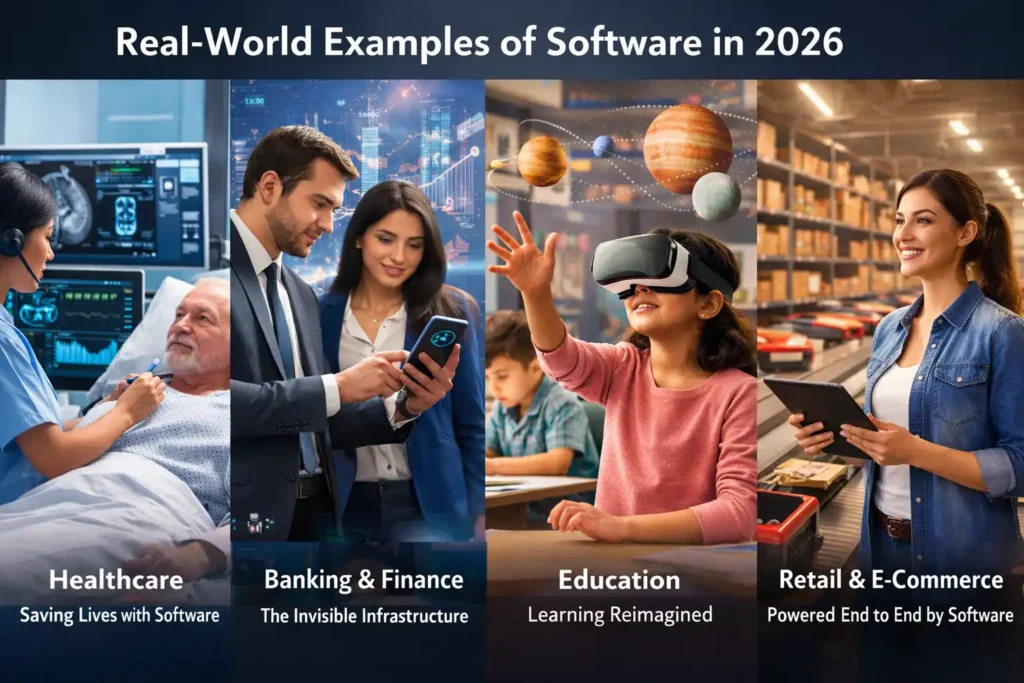
The most effective way to understand what software is is to see it in action across different industries. Here are real-world examples of software that are transforming sectors in 2026.
Healthcare — Saving Lives with Software
Modern hospitals operate on Electronic Health Record (EHR) software like Epic and Cerner, which store, update, and share patient data across departments. AI-powered diagnostic software can now detect cancers from medical imaging with accuracy exceeding 95%. Telemedicine platforms have brought quality healthcare to rural and underserved populations globally.
Banking & Finance — The Invisible Infrastructure
Every ATM withdrawal, mobile payment, and stock trade depends on software. Core banking software processes millions of transactions daily. Fraud detection algorithms powered by machine learning flag suspicious activity in real time. In 2026, over 3.6 billion people use mobile banking apps — all built and maintained by software engineers.
Education — Learning Reimagined
Learning Management Systems (LMS) like Moodle, Canvas, and Blackboard now power education at every level — from primary schools to global universities. AI tutoring software provides personalized learning paths, adapting in real time to each student’s pace and performance. The EdTech software market surpassed $250 billion in 2025.
Retail & E-Commerce — Powered End to End by Software
From the moment a customer browses your website to when their package arrives at the door, retail software manages everything: product catalogs, inventory, payments, order fulfillment, and customer service. Point-of-Sale (POS) software, recommendation engines, and supply chain management systems are all mission-critical software in retail.
If you are running a retail or e-commerce business and relying on disconnected spreadsheets and generic tools, ClickMasters can help you upgrade to a unified, custom-built software system. Visit our ClickMasters Software Solutions to see the platforms we have built for businesses like yours.
Open Source vs. Proprietary Software — Which Is Right for You?
When choosing software for your business or project, one of the first decisions you face is open source vs. proprietary software. Both have real advantages and real trade-offs.
| Open Source Software | Proprietary (Paid) Software | |
| Cost | Free to use and modify | Paid license or subscription |
| Examples | Linux, WordPress, VLC, LibreOffice | Windows, Adobe CC, Salesforce, AutoCAD |
| Customization | Fully customizable — access to source code | Limited to vendor-provided settings |
| Support | Community forums, documentation | Dedicated vendor support |
| Security | Transparent code (faster bug fixes) | Closed code (vendor-managed patches) |
| Best for | Tech-savvy teams, tight budgets | Businesses wanting ready-to-use tools |
Pro Tip: Many businesses use a hybrid approach — open-source platforms as the foundation (like WordPress or Linux) with custom proprietary layers built on top. ClickMasters can help you design the right stack for your specific needs.
What Is Custom Software Development & Why Does Your Business Need It?
Ready-made, off-the-shelf software works for general use cases — but it rarely fits a specific business perfectly. This gap is exactly why custom software development has become one of the fastest-growing segments of the global tech industry.
Custom software is built from scratch (or on a flexible framework) to match your exact business processes, workflows, data structures, and user needs. Unlike generic SaaS tools that force you to adapt your business to their features, custom software is built to work the way you work.
What Problems Does Custom Software Solve?
• Operational Gaps: Generic software cannot automate your specific workflow. Custom software can.
• Integration Issues: Multiple disconnected tools that do not talk to each other. Custom software unifies them.
• Scalability Limits: Off-the-shelf tools hit walls as your business grows. Custom software scales with you.
• High SaaS Costs: Monthly subscriptions for 5–10 different tools add up fast. A custom solution can replace them all.
• Security & Compliance: Custom software can be built to meet your exact data privacy and compliance requirements.
Measurable Impact of Custom Software
• 40–60% increase in team productivity through task automation and streamlined workflows
• 30–50% reduction in operational costs by replacing multiple SaaS subscriptions with one integrated system
• Faster decision-making through real-time dashboards and custom reporting built for your KPIs
• Stronger customer experience through software designed around your specific customer journey
At ClickMasters, we have designed and delivered custom software solutions for businesses across retail, healthcare, logistics, education, and finance. Our process is transparent, agile, and results-focused — from requirements gathering to final deployment.
Whether you need a web application, mobile app, ERP system, POS software, inventory management tool, customer portal, or AI-powered automation platform — our team builds it to your exact specifications, on time and on budget.
Ready to explore what a custom-built solution can do for your business? Visit theClickMasters Software Development Page and request a free strategy consultation with our team. We will analyze your current setup and show you exactly where custom software can save you time, cut costs, and drive growth.
The question is not whether your business needs custom software. It is how much longer you can afford to operate without it.
What Does the Future of Software Look Like Beyond 2026?
The software industry is evolving faster than at any point in its history. Five major forces are redefining what software is, who builds it, and how it is used — in 2026 and beyond.
AI-Native Software Is Becoming the Standard
Artificial intelligence is no longer a standalone product. It is being embedded into every category of software — from AI writing assistants in Google Docs to predictive maintenance in industrial software, to AI-powered customer service bots in e-commerce platforms. By 2027, analysts estimate that over 80% of new software will include some form of AI or machine learning capability.
Low-Code and No-Code Is Democratizing Development
Platforms like Bubble, Webflow, Retool, and Microsoft Power Platform allow non-developers to build functional, production-grade software with little or no coding. The low-code/no-code market is projected to reach $187 billion by 2030. This does not replace professional developers — it expands who can participate in software creation.
Software Is Moving Entirely to the Cloud
The shift to cloud-native software continues to accelerate. SaaS (Software as a Service), PaaS (Platform as a Service), and IaaS (Infrastructure as a Service) models mean businesses can access enterprise-grade software through a browser — no installation, no on-premise servers, no IT overhead.
Security Is Now Built Into Development, Not Added After
With global cybercrime costs exceeding $9.5 trillion in 2024, software security has become a board-level priority. DevSecOps — integrating security testing at every stage of the software development lifecycle — is now the industry standard. Businesses working with ClickMasters get software built with a security-first architecture from day one.
Edge Computing Is Pushing Software Closer to Users
Rather than processing data in distant cloud servers, edge computing runs software directly on devices or local servers — enabling real-time responses for IoT devices, autonomous vehicles, smart manufacturing equipment, and AR/VR applications. This trend will redefine performance expectations for all software.
Conclusion — Software Is Not Just Technology. It Is Business Infrastructure.
Software is the invisible engine behind everything the modern world runs on. It is the intelligence in your devices, the logic in your apps, the security in your transactions, and the efficiency in your operations. Understanding what software is — and leveraging it strategically — is no longer optional for businesses that want to compete in 2026.
From system software that keeps devices running, to application software that powers your daily workflows, to custom software solutions that give your business a genuine competitive edge — software at every level shapes how you work, serve customers, and grow.
At ClickMasters, we do not just build software — we build business solutions that happen to be software. Our team of experienced developers, designers, and strategists works with you to understand your challenges and deliver systems that drive measurable results.
If you are ready to stop working around the limitations of generic tools and start working with software built specifically for your business, visit the ClickMasters Software Development page and let us show you what is possible.
GET IN TOUCH
Get 1 Free Consultation Call
Frequently Asked Questions (FAQ)
What is software in simple terms?
Software is a set of digital instructions that tells a computer or device what to do. It includes all the programs, apps, and operating systems that run on hardware — from your phone’s keyboard app to the systems that run global banking infrastructure.
What are the 3 main types of software?
The three main types are: (1) System Software — operating systems and drivers that manage hardware; (2) Application Software — apps and programs that users interact with directly; and (3) Programming/Development Software — the tools used to build other software.
What is the difference between software and an app?
All apps are software, but not all software is an app. An ‘app’ is a specific type of application software designed for end users. Software also includes operating systems, device drivers, firmware, and development tools that are not considered apps.
What is custom software development?
Custom software development is the process of designing, building, and deploying software specifically for a particular organization or use case — as opposed to using ready-made, generic software. ClickMasters specializes in custom software development for businesses. Explore our Software Solutions to learn more.
What is an example of system software?
Common examples of system software: Windows 11, macOS Sequoia, Android 15, Linux Ubuntu, BIOS/UEFI firmware, and hardware device drivers like graphics or audio drivers.
How does software make money?
Software businesses generate revenue through several models: one-time purchase licenses, monthly or annual SaaS subscriptions, freemium models (free basic, paid premium), usage-based pricing, and enterprise contracts. The global software market is projected to exceed $1.1 trillion by the end of 2026.
Why should a business invest in custom software?
Off-the-shelf software forces your business to adapt to it. Custom software adapts to your business. It eliminates inefficiencies, automates your specific workflows, integrates your existing tools, and gives you a system that grows exactly as your business grows. ClickMasters helps businesses make this transition — for a free consultation.